Comparing SmailPro, Temp-Mail.org, 10MinuteMail.net, and Mail.tm
Comparing four temporary email services across multi-inbox handling, lifespan, address recovery, sharing, and address management—no speed benchmarks or deliverability races to crown a generic "winner."
A temporary email address usually starts with a tiny task: grab a verification code, click an activation link, or download a file, then close the tab. But real work rarely stays that simple. The email arrives late, you need a second address for another test account, you need to reopen an older inbox, or you need to let a coworker see the incoming mail.
At that point, the question is no longer whether a service can generate a throwaway address. Every tool here does that. The real differences come down to how each service organizes multiple inboxes, controls expiration, stores address history, and lets you return later.
This comparison puts SmailPro, Temp-Mail.org, 10MinuteMail.net, and Mail.tm side by side in one table. After the table, we break down where SmailPro holds an advantage once your work outgrows a single disposable inbox, along with the specific situations where the other three setups still make complete sense.
Comparison table: SmailPro, Temp-Mail.org, 10MinuteMail.net, and Mail.tm
This table focuses on the practical differences that drive your choice: multi-inbox support, address sources, lifespan, recovery, and email rendering.
Test data verified on September 10, 2026
✅ Directly tested · 📄 Official documentation · ⚠️ Conditional · ❌ Not found in tested free tier flow · [—] Insufficient data.
Not foundmeans the feature was not available in the free flow tested; it does not prove the feature does not exist on another plan.
Star ratings reflect practical fit for each specific row. They are not scores for speed, security, deliverability, or universal acceptance across websites.
| Criteria | SmailPro | Temp-Mail.org | 10MinuteMail.net | Mail.tm |
|---|---|---|---|---|
| 🗂️ Multi-inbox: capacity and switching | ⭐⭐⭐⭐⭐ (5 free inboxes, 20 on Premium) ✅ Switch inboxes directly within one workspace interface. |
⭐⭐ (Free focuses on 1 inbox) ❌ No multi-inbox management interface found in tested free flow. |
⭐ (1 timed inbox per session) ❌ Generating a new address replaces the active session. |
⭐⭐⭐ (1 mailbox per account) ⚠️ Switching mailboxes requires logging in with a different email/password pair. |
| Standard domain emails | Manual domain choice ✅ Pick your preferred domain from SmailPro's dropdown list. |
Auto-generated default domain ✅ System generates an address on a default domain; no manual selection. |
Auto-generated default domain ✅ System generates an address on a default domain; no manual selection. |
Auto-generated default domain ✅ System generates an address on a default domain; no manual selection. |
| Google and Microsoft addresses | Google & Microsoft Bonus Pool included ✅ Available directly inside SmailPro. |
No equivalent option found ❌ Not found in tested free tier flow. |
No equivalent option found ❌ Not found in tested free tier flow. |
No equivalent option found ❌ Not found in tested user flow. |
| Inbox lifespan | Fixed 3 days (Free), 7 days (Premium) ✅ Fixed lifespan for SmailPro-managed domains with countdown display; no browser tab dependency. |
Single browsing session ✅ Tested: inbox stays active during the session; expires roughly 10 minutes after closing. |
10 minutes, extendable by 10 minutes ✅ Clear countdown timer; requires active extension clicks. |
Mailbox persists until deleted 📄 Messages retained for 7 days. |
| History and inbox recovery | History → Restore ✅ Free stores 500 local entries; Premium stores 2,000 local and 1,000 cloud. |
No equivalent mechanism in Free — Premium message storage is not address history or restore. |
History or recovery link 📄 Documented officially; ⚠️ depends on browser storage, link validity, and service conditions. |
Login via email/password 📄 No password reset option. |
| Email rendering and attachments | Full rendering in test fixture ✅ HTML, inline images, and attachments all rendered properly. |
HTML, inline images, and attachments ✅ All rendered cleanly in the tested fixture. |
Attachments supported ❌ HTML and inline images failed to render properly during testing. |
Content and attachments supported ❌ Inline images did not render during testing. |
| Inbox sharing | Shareable link ✅ No password sharing required. ✅ Anyone with the link can view incoming mail. |
No dedicated share link found ❌ QR code is not the same sharing mechanism. |
No dedicated share link found ❌ Not found in the tested free UI. |
No dedicated share link found ❌ Sharing credentials grants full mailbox access. |
| 🛡️ Lowering disposable email detection | No catch-all, regular domain rotation ✅ SmailPro rotates domain lists periodically to reduce the risk of disposable email detection. |
No catch-all ✅ Test result: Catch-all: No. |
Catch-all: Yes ✅ Test result: Catch-all: Yes. |
No catch-all ✅ Test result: Catch-all: No. |
| API | Ecosystem API available 📄 This article does not benchmark billing, tier allowances, or uptime stability. |
Dedicated developer API 📄 Supports domains, messages, and attachments. |
No official API verified — No public API documentation found on the main site. |
Free API available 📄 General rate limit of 8 requests/second/IP. |
Across the verified data, SmailPro's advantage comes down to a specific combination: multiple active inboxes in one workspace, fixed lifespans (3 days on Free, 7 days on Premium), local address history with conditional restore, multiple address sources, link sharing, plus no catch-all routing and regular domain updates. That bundle matters most when your task does not end after catching a single email.
The advantage is the workflow combination
You can move from catching one message to managing multiple addresses right inside SmailPro without switching tools mid-task.
Multiple inboxes in a single workspace
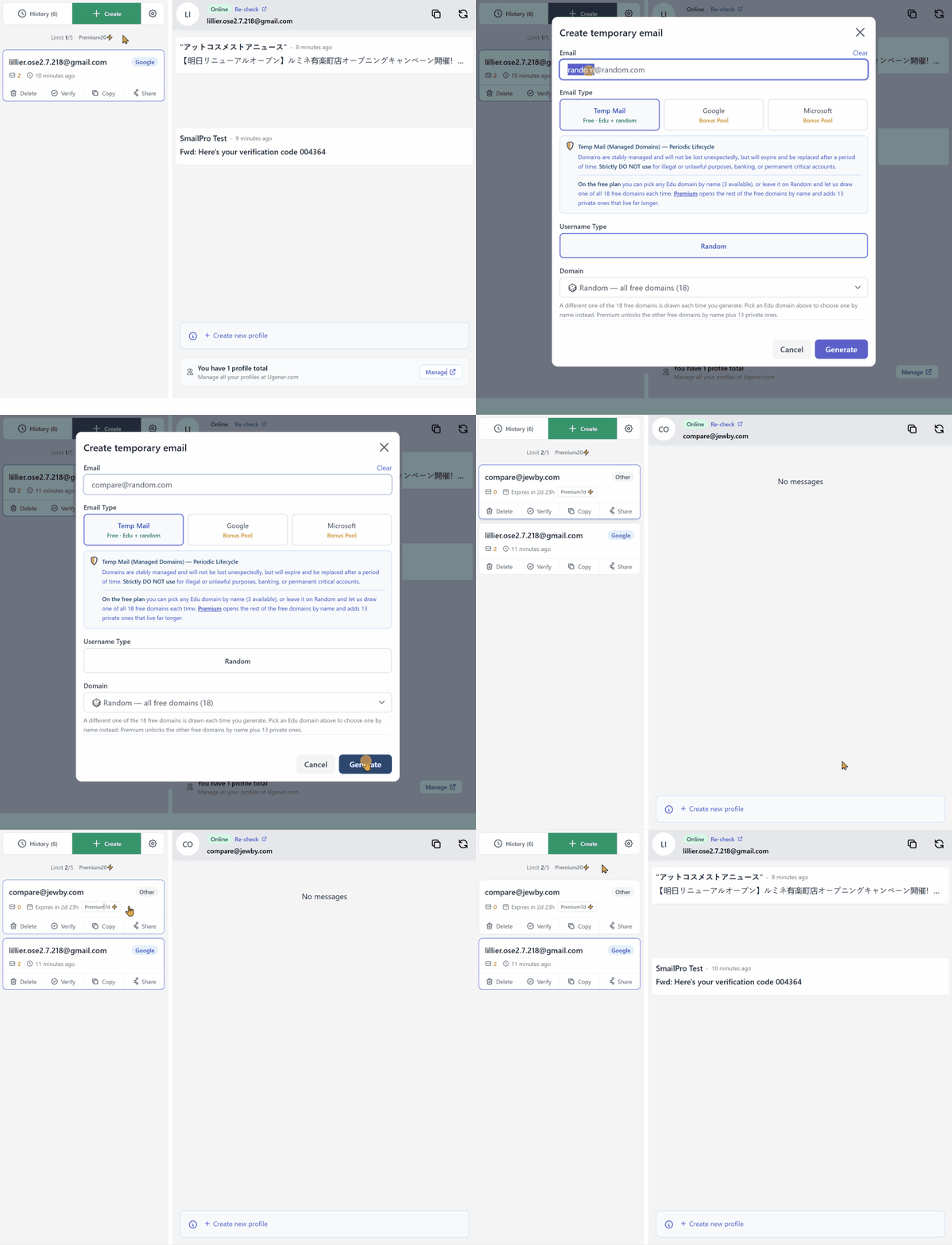
The Free plan lets you keep up to 5 active inboxes; Premium raises that limit to 20 based on the current pricing snapshot. The inboxes sit in one unified list, so you can switch contexts without opening ten browser tabs or juggling separate logins for each mailbox.
Five free inboxes is not an industry monopoly. What makes it practical is how SmailPro pairs multi-inbox with history, restore, fixed expiration, multiple address sources, and link sharing. You start with one inbox, then use those extra layers only when the task calls for them. See our Features breakdown for a complete view of plan capabilities.
The GIF below shows two inboxes created and toggled within the same workspace interface.
Expiration, history, and restore solve three separate problems
For mailboxes using SmailPro-managed domains, inbox lifespan runs for a fixed 3 days on Free and 7 days on Premium. That window gives you breathing room compared to a 10-minute timer when a verification message is delayed or you need to follow up later. Each inbox key is granted a lifespan matching the mailbox, meaning you can safely close your browser or leave the page for days without losing access before the timer expires.
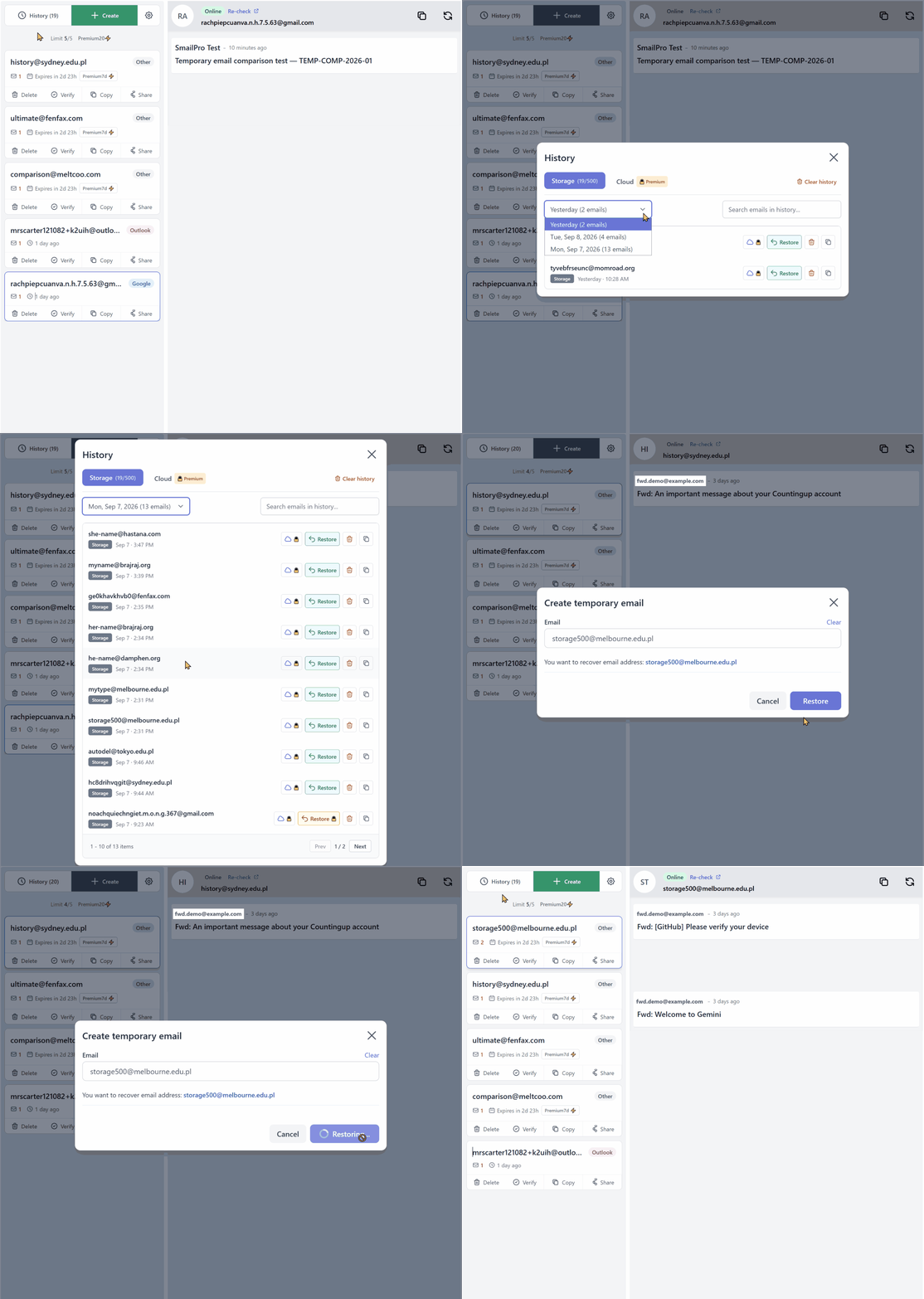
If you close an inbox or reach your capacity limit, the Free tier's local history retains up to 500 address entries (raised to 2,000 local and 1,000 cloud on Premium) and includes a date filter. You can narrow down the list before picking the address you need to reopen. Addresses on SmailPro-managed domains can be restored as long as the underlying domain remains active. For a step-by-step walkthrough of this workflow, see our SmailPro How-to Guide.
These three mechanisms serve distinct roles: fixed expiration keeps the inbox accessible across sessions without sliding deadlines, the history date filter helps locate past addresses by the day you used them, and restore puts eligible addresses back into your active workspace.
History is not a full archive of email bodies and attachments across all devices. Local data depends on your browser storage (IndexedDB), and restore eligibility depends on address type, domain availability, and pool status. In addition, when you delete a Temp Mail inbox, SmailPro triggers an immediate server-side deletion (POST /app/delete) on the mail server to permanently clear received messages, keeping your data footprint clean.
From History, you can filter by date and select an eligible address to restore.
Multiple address sources and domain management
Beyond standard SmailPro-managed domains, you can also select addresses from Google and Microsoft pools. These address types live in the same interface, though they carry different usage conditions and stability profiles. Gmail and Outlook addresses come from bonus third-party account pools included with the service, not permanent personal mailboxes with long-term guarantees. Learn more about their operational differences in our Features guide.
For standard domains, SmailPro avoids catch-all routing. Along with periodic domain rotation, this setup aims to reduce the risk of domains getting flagged by automated disposable email detectors.
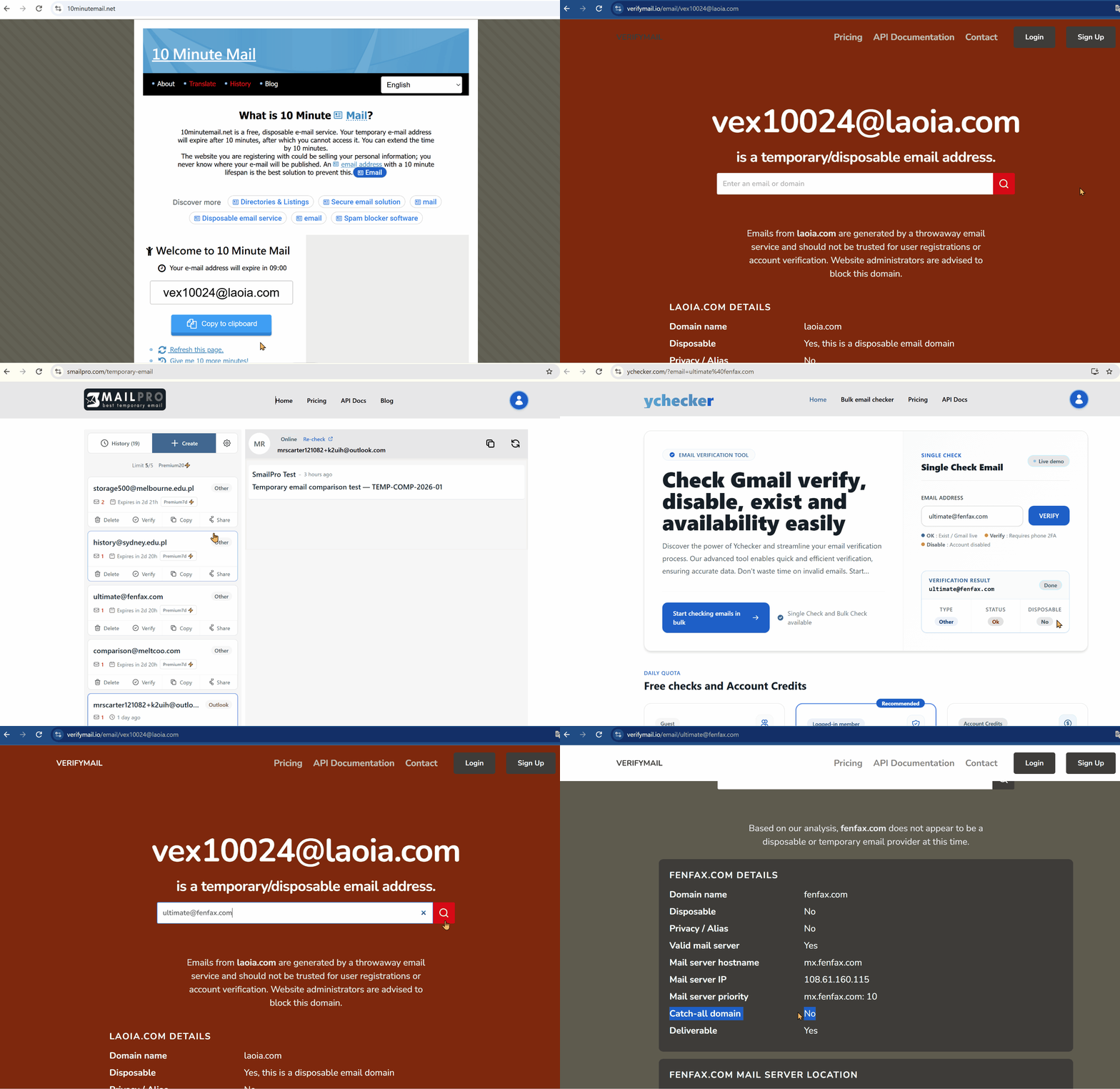
SmailPro embeds a Ychecker button for quick on-page checks of the active address. In our test pass, a SmailPro sample returned Disposable: OK on Ychecker. Checked against VerifyMail, the same sample showed Catch-all: No and reported no indicators of being a temporary/disposable provider at that moment. By comparison, a 10MinuteMail.net sample showed Catch-all: Yes and was flagged by VerifyMail as a temporary/disposable address.
Seeing Catch-all: Yes alongside a temporary/disposable flag on the 10MinuteMail.net sample does not prove catch-all routing caused the classification.
The GIF below records the checks using embedded Ychecker and VerifyMail.
Address status changes across domains, detector algorithms, and time. No catch-all and periodic domain updates lower the risk of disposable classification; they do not make addresses undetectable, guarantee bypass against every filter, or promise acceptance on every site. These findings apply strictly to the samples tested on September 10, 2026, and do not represent the full domain pool of any service.
Sharing inboxes without handing over credentials
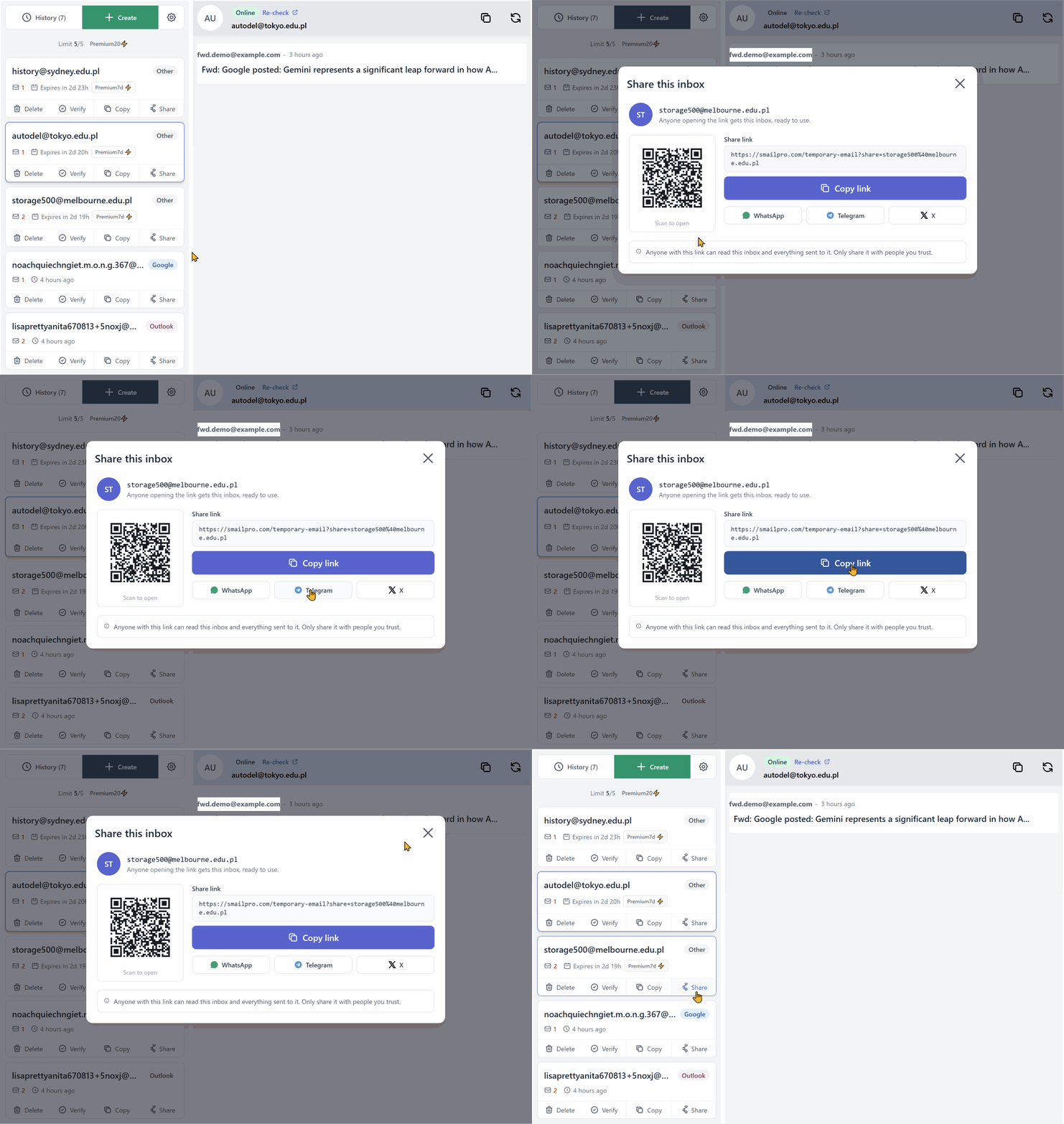
Each inbox can be shared via a web link, according to the tested UI and pricing snapshot. In quick collaboration flows, the recipient can view incoming mail without logging into a master account or receiving a separate password. For step-by-step sharing instructions, follow our inbox sharing guide.
Here is the catch: the share link is direct access. Anyone with the link can view incoming mail under the current sharing model. Do not use it for sensitive emails, and do not send the link beyond who actually needs to see the messages. Review our Security & Privacy Guide for a complete threat model of temporary inboxes.
You can generate a link and open the shared inbox view without sharing mailbox credentials.
No single feature makes SmailPro an automatic pick. The real value is having multi-inbox, lifespan controls, history/restore, link sharing, and multiple address sources working together in one flow. When your task grows, you can expand right where you are.
When the other three services still make sense
Not every task calls for SmailPro's broader workflow. If your requirements center on one specific interaction, a tool built around that single pattern can be a simpler pick.
Temp-Mail.org: when you just need one simple inbox
Choose Temp-Mail.org when all you want is to open a page, grab an address, and watch one inbox. It is the classic throwaway email flow with zero signup required.
If your only job is waiting on a single email, an interface locked to one inbox gives you fewer moving parts to manage. During testing, multi-address management, custom domains, and dedicated Premium domains were listed under the Premium tier—not confirmed free features. SmailPro handles single-inbox tasks just as easily, but keeps the door open to multi-inbox management in the same workspace.
10MinuteMail.net: when you want a clear 10-minute session
Choose 10MinuteMail.net when you want a visible 10-minute countdown that you can manually extend. The timer sets clear boundaries for quick throwaway tasks. The button to add 10 minutes lets you push the deadline if the email has not arrived or your sign-up is taking longer than expected.
Do not assume an address vanishes forever after 10 minutes, though. The official site includes a History tab and documentation on semi-persistent recovery links, though actual recovery depends on browser storage, link validity, and specific service conditions. The contrast with SmailPro is the operational rhythm: one extends in 10-minute increments; the other provides fixed 3-day (Free) or 7-day (Premium) lifespans on SmailPro-managed domains without requiring manual renewal clicks during normal use.
Mail.tm: when you want dedicated credentials for each mailbox
Choose Mail.tm when you prefer each mailbox to function as an isolated account with its own email address and password. This model works well if you are comfortable saving credentials in a password manager to revisit specific inboxes later. Per official documentation, mailboxes remain active until deleted by the user, and messages are kept for 7 days.
The trade-off is credential overhead: managing several mailboxes means managing several logins. Mail.tm has no password reset, so losing a password means losing access to that mailbox for good. SmailPro handles multiple inboxes inside one workspace using local history and conditional restore. It is a fundamental difference in management approach, not proof that one design is inherently safer than the other.
Temp-Mail.org, 10MinuteMail.net, and Mail.tm remain solid choices when their setup matches your exact job: one clean inbox, an explicit 10-minute countdown, or dedicated account credentials. SmailPro fits better when your work is likely to expand into multiple inboxes, address history, restore, or link sharing inside a single tab.
SmailPro is not just for multi-inbox workflows
If you only need to catch one email and walk away, SmailPro handles that basic task just as cleanly as the competition. The difference is that you are not stuck with an auto-assigned domain. In the free tier tested, SmailPro let you choose between SmailPro-managed domains and Gmail or Outlook addresses available in the Google/Microsoft Bonus Pool.
That choice helps when an initial address gets rejected by a sign-up form or an activation email fails to arrive. You can switch address sources right inside SmailPro instead of abandoning the site for another provider. That does not guarantee delivery on every site, but it gives you an immediate alternative before jumping ship.
When needs grow, SmailPro has multi-inbox, fixed 3- to 7-day lifespans, history, conditional restore, and link sharing ready to use. Temp-Mail.org, 10MinuteMail.net, and Mail.tm remain sensible when you prefer a single inbox, a 10-minute countdown, or individual account credentials.
You can start with the free workflow and match available address options to what you actually need. Whichever service you pick, temporary email is the wrong tool for critical accounts requiring long-term recovery or handling sensitive data. No provider can guarantee universal acceptance across the web or that every email will land.
Next steps: choose your setup
- 🚀 Ready to try multi-inbox? 👉 Open the Temporary Email Tool and create an inbox
- 📖 Step-by-step instructions: Read our SmailPro How-to Guide for detailed steps on creating, managing, restoring, and troubleshooting inboxes.
- 💎 Compare plans: Review SmailPro Free vs Premium Pricing or inspect all capability limits in our Features overview.